Optimized Data Storage: How Hot, Warm, and Cold Storage Improve Digital Organization
Understanding hot, warm, and cold storage helps users improve performance, reduce storage costs, enhance data security, and manage cloud and primary storage efficiently using a tiered storage strategy.
 Tech Author

Not all digital storage works in the same manner, but many individuals keep everything in one location without considering how frequently the data is utilized. This strategy can slow down devices, raise costs and increase the likelihood of data loss. Understanding the hot, warm, and cold storage tiers can help users manage files more effectively, increase performance, and save money.
Why Primary Storage Causes Performance and Data Management Issues
In a primary storage setup, all files are regarded equally important. This means that essential system files or work documents may be stored alongside old photos, unused videos, or files that have not been opened for years. When fast and expensive storage, such as an SSD, is overloaded with unnecessary data, the system might become slow and cluttered. Backups take longer since the device must scan vast volumes of unchanged data. If the main drive fails, everything may be lost at once. This is why primary storage frequently causes performance issues and makes data management difficult.
Understanding Hot, Warm, and Cold Storage
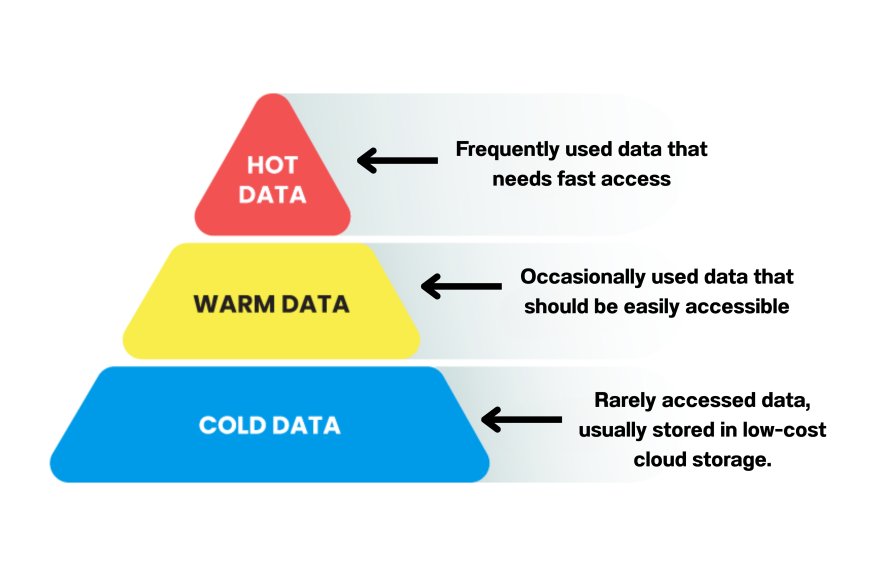
To solve this, storage is commonly divided into three tiers: hot storage, warm storage, and cold storage.
Hot storage: It is for data you use every day. This includes the operating system, apps, active work files, and games. It usually sits on system’s primary storage drive, which is very fast but costly and limited in size. Keeping only essential files here helps your device stay quick and responsive.
Warm storage: It is for data that is still useful but not needed all the time. Examples include recent photos, completed projects, or media files used occasionally. This data may be stored on an external hard drive or regular cloud storage. It’s slower than hot storage but cheaper and still easy to access. It acts as a balance between speed and cost, giving users enough performance without paying for expensive storage. Warm storage also helps free up space on primary drives, keeping systems organized and efficient.
Cold storage: It is meant for files you rarely open but still need to keep. Old photos, past backups, and archived documents belong here. Cold storage can be provided through archival cloud storage, which is more secure and reliable than physical drives. In many cases, old data must also be stored for legal or compliance purposes, making long-term archiving important. Using cloud-based cold storage helps protect this data from physical damage while ensuring it remains available when required.
Why Tiered Storage Leads to Better Performance, Security, and Cost Savings
Knowing these storage levels allows consumers to make better decisions. You don't need expensive storage for each file. Using tiered storage keeps devices running quickly, enhances data backup and security, and saves money on storage devices with high capacity or monthly cloud services. It also safeguards key memories by shielding them from everyday risks. This technique simplifies digital management and lowers clutter on major devices. It also reduces the possibility of data loss during hardware failures or cyber events. Overall, tiered storage allows users to maintain efficiency, security, and control over their data.
In simple terms, using the right storage for the right data gives you better performance, better organization, and better control over your digital life.